
Grails App-Info plugin
Update July 5, 2012: See this blog post for an updated test app and support for Grails 2.0+.
I released a new Grails plugin today, app-info. This plugin exposes a lot of internal information for a Grails application. Most of the code for this plugin dates back a long time and was originally mostly JSPs that I would copy into whatever application I was working on to give myself a view into what’s going on. Over time as I started using Spring and Hibernate I added more pages to display that information, and it now also shows information about Grails too.
Click any of the images to see the full-size version in a new window.
Configuration
This plugin uses the Dynamic Controller plugin to modularize the controller actions as mixins. There are several of them and if there are some you don’t want or need, you can exclude them. None are configured by default – that has to be done in your application’s grails-app/conf/Config.groovy file. Here’s the configuration from the sample application (download link at the end):
grails.plugins.dynamicController.mixins = [
   'com.burtbeckwith.grails.plugins.appinfo.IndexControllerMixin':       'com.burtbeckwith.appinfo_test.AdminManageController',
   'com.burtbeckwith.grails.plugins.appinfo.HibernateControllerMixin':   'com.burtbeckwith.appinfo_test.AdminManageController',
   'com.burtbeckwith.grails.plugins.appinfo.Log4jControllerMixin' :      'com.burtbeckwith.appinfo_test.AdminManageController',
   'com.burtbeckwith.grails.plugins.appinfo.SpringControllerMixin' :     'com.burtbeckwith.appinfo_test.AdminManageController',
   'com.burtbeckwith.grails.plugins.appinfo.MemoryControllerMixin' :     'com.burtbeckwith.appinfo_test.AdminManageController',
   'com.burtbeckwith.grails.plugins.appinfo.PropertiesControllerMixin' : 'com.burtbeckwith.appinfo_test.AdminManageController',
   'com.burtbeckwith.grails.plugins.appinfo.ScopesControllerMixin' :     'com.burtbeckwith.appinfo_test.AdminManageController'
]
With this configuration all of the URLs will start with http://localhost:8080/appname/adminManage. My preference is to re-map these in grails-app/conf/UrlMappings.groovy to http://localhost:8080/appname/admin/manage since I want the administration parts of the application under /admin/**. This is optional but if you want to do this see the configuration in the sample app.
Note: This plugin exposes a lot of information about your application so you’re strongly recommended to use a security plugin and guard these URLs. The sample application uses the Spring Security Core plugin but you’re free to restrict access however you like, and optionally not even include this in your production war.
Usage
The Attributes menu has three entries:
Application
Displays all application-scope attributes from the ServletContext
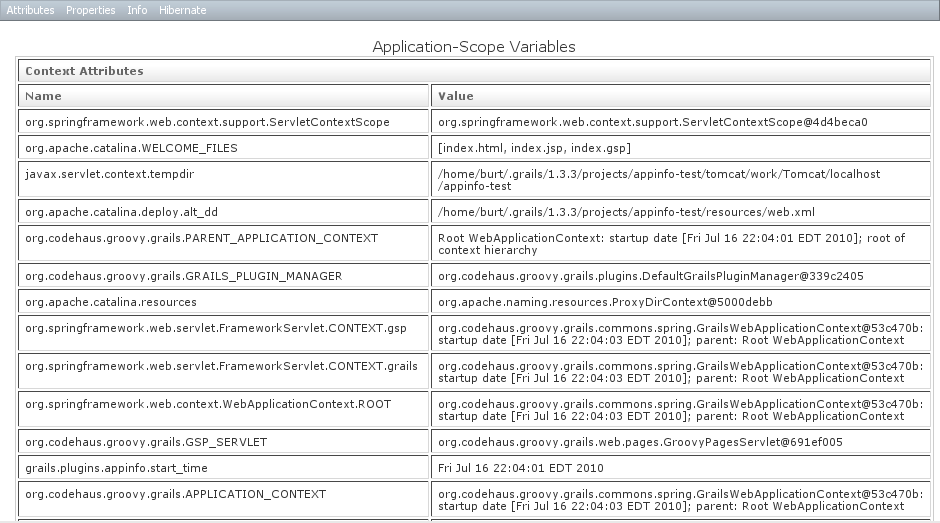
Request
Displays all request-scope attributes from the current HttpServletRequest. Since this is for the current request, it’s mostly useful to see what’s available in a typical request.

Session
Displays all session-scope attributes from the current HttpSession. Since this is for the current request, it’s mostly useful to see what’s available in a typical session.
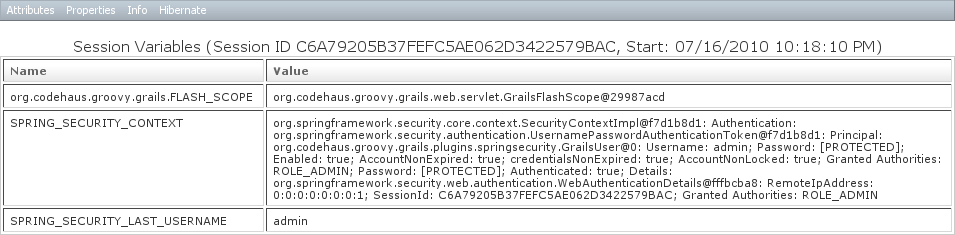
The Properties menu has three entries:
Data Source
A read/write view of the DataSource bean. Depending on the DataSource implementation, changing an attribute will take effect immediately and reset the connection pool
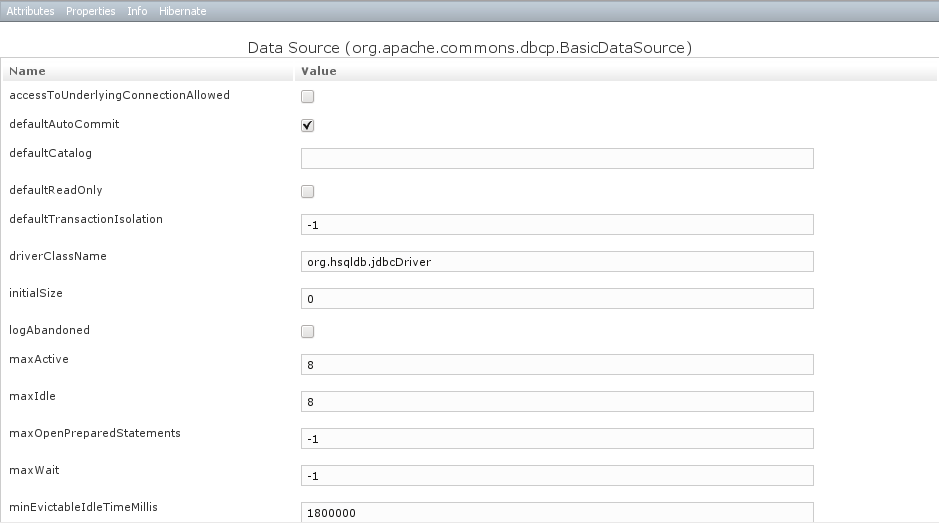
Grails Properties
Read-only view of the Grails Configuration.
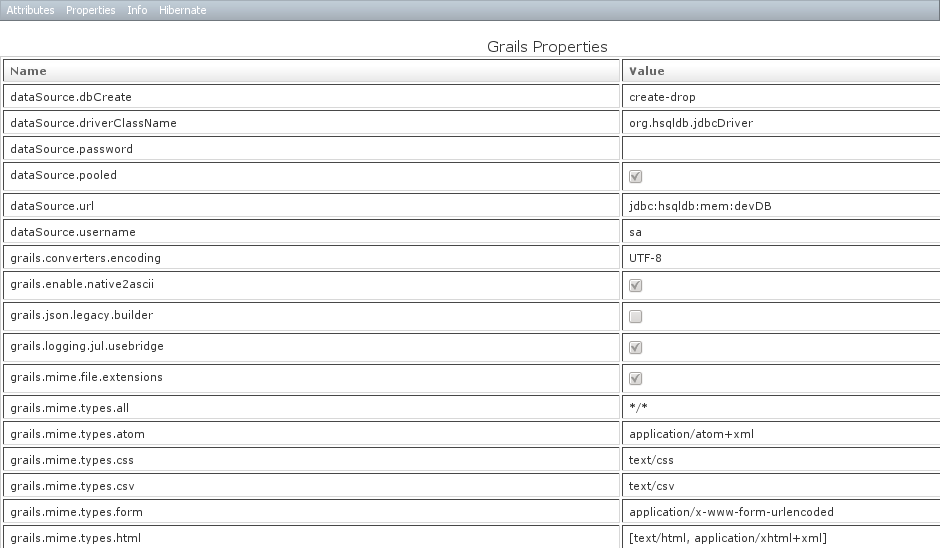
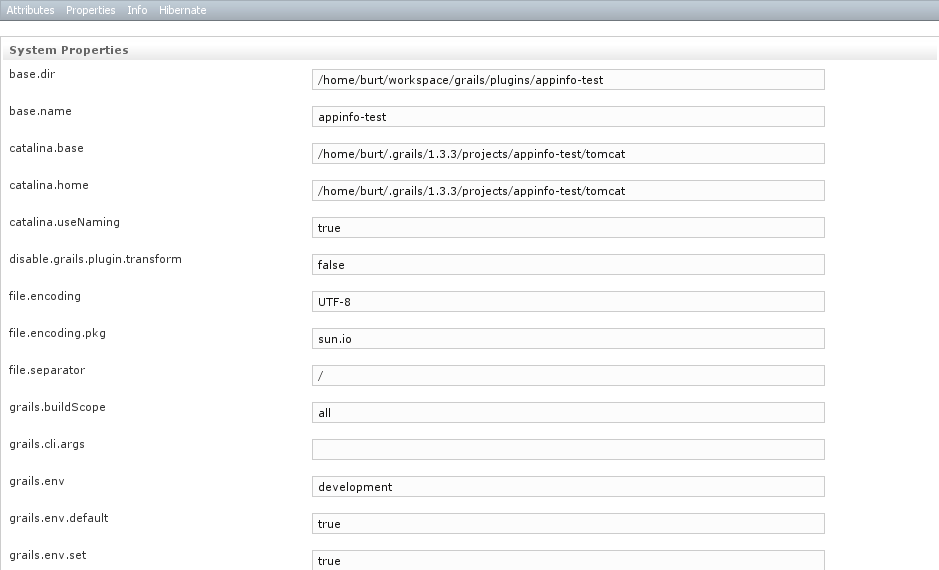
System Properties
Read/write view of system properties. You can alter current properties or add new ones.
The Info menu has five entries:
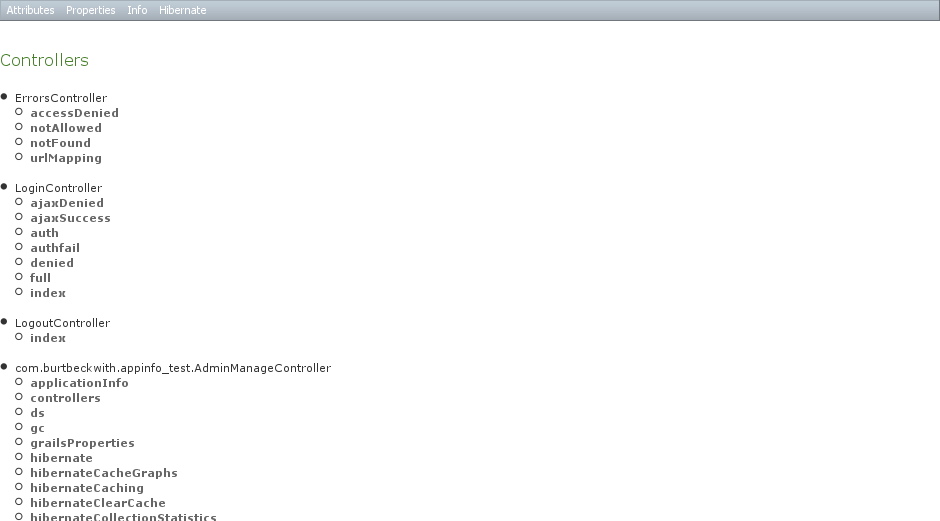
Controllers
All controllers, plus links to all actions
Logging
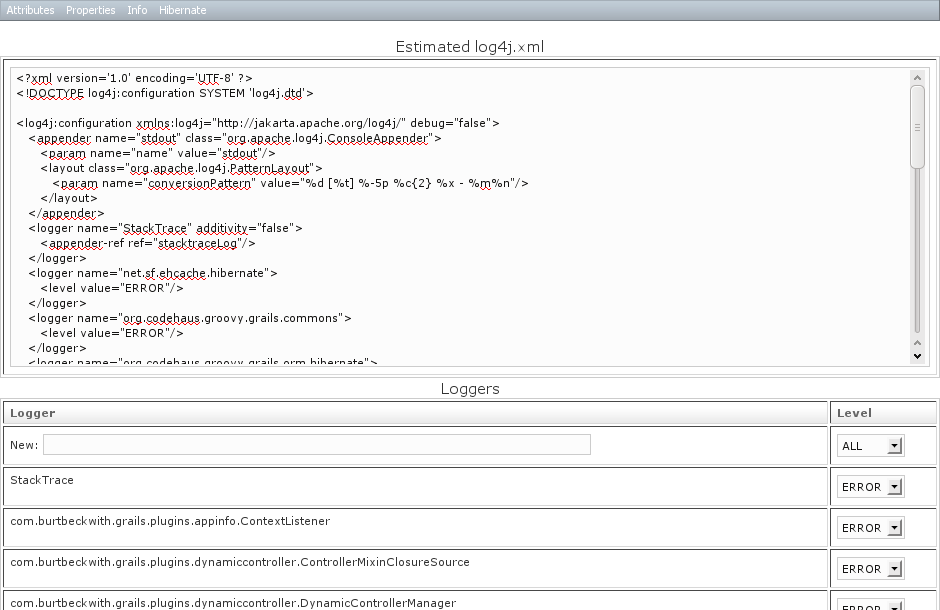
Has comboboxes for all loggers to change the log level at runtime. Also has a text field to register a new Logger and its level.
Also includes a reverse-engineered log4j.xml based on the in-memory Log4j configuration. This is an estimate, so it may not be 100% accurate. But if you’re having logging configuration issues and are familiar with the log4j.xml format, this can be convenient for diagnosing how things are misconfigured.
Memory
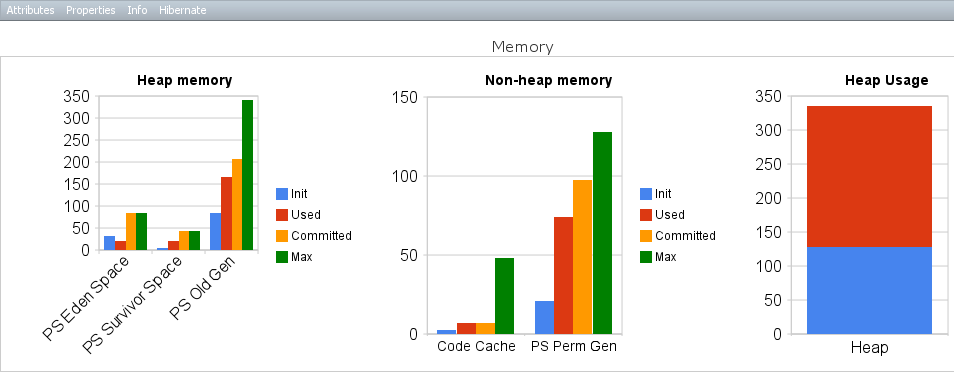
Graphs describing memory usage. Also has an action to trigger explicit garbage collection.
Sessions
Displays all current sessions and session-scope variables with a link to invalidate the session. This is enabled by default; to disable set grails.plugins.appinfo.useContextListener = false in grails-app/conf/Config.groovy

Spring Beans
Spring bean information for all beans in the “main” context and the parent context
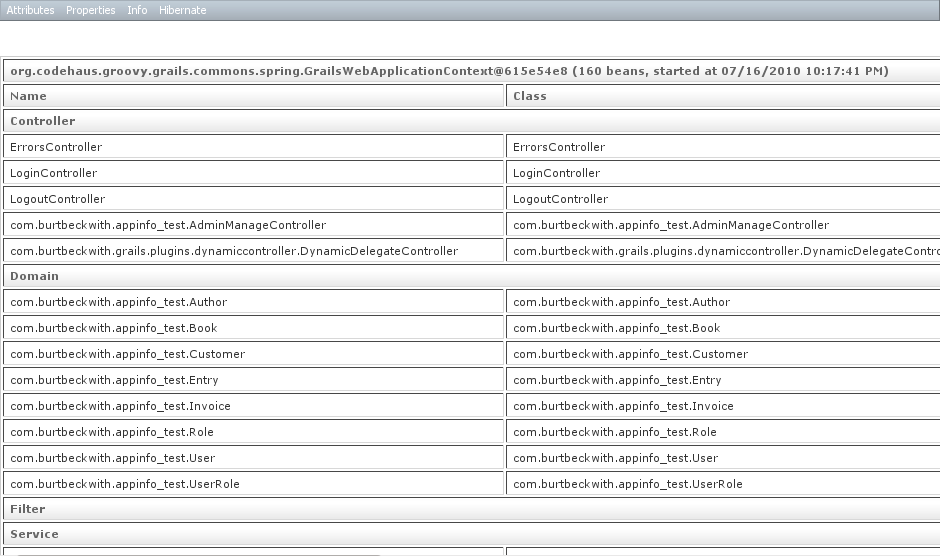
The Hibernate menu has five entries and several sub-actions
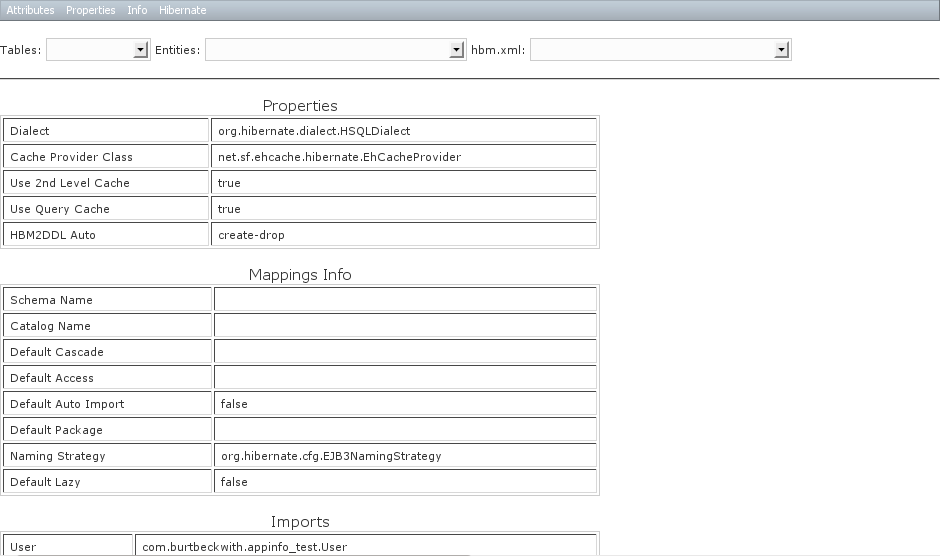
Overview
- Properties
- Mappings Info
- Imports
- Auxiliary Database Objects
- Named Queries
- Named SQL Queries
- TypeDefs
- Filter Definitions
Entity Graphs
ER-style graphs of all Hibernate classes with relationships.
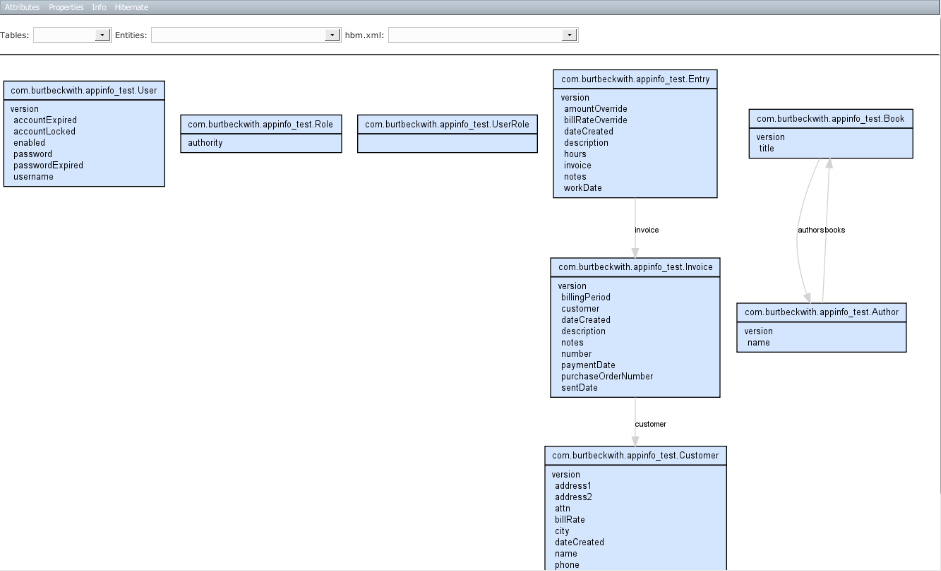
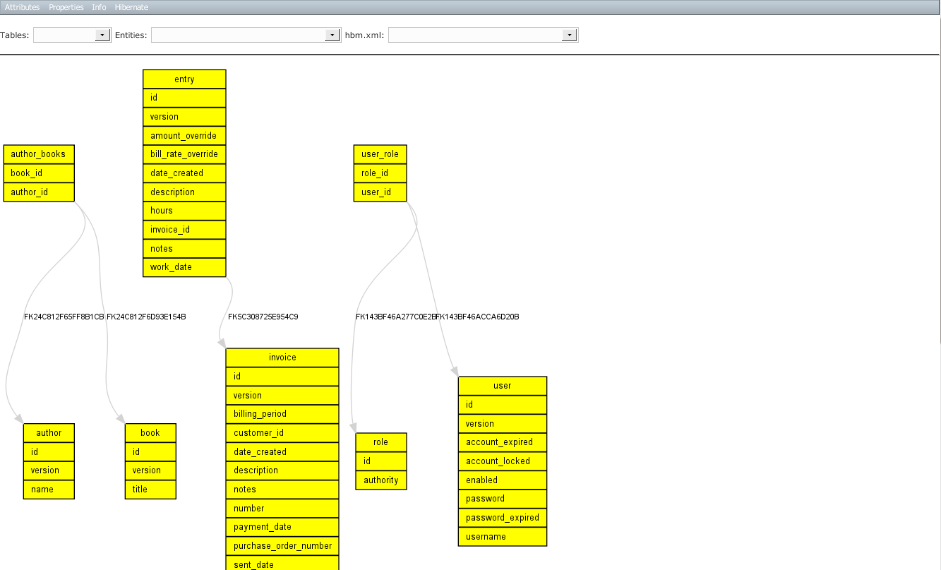
Table Graphs
ER-style graphs of all tables with relationships.
Caching
2nd-level cache information for StandardQueryCache, UpdateTimestampsCache, and all domain class caches.
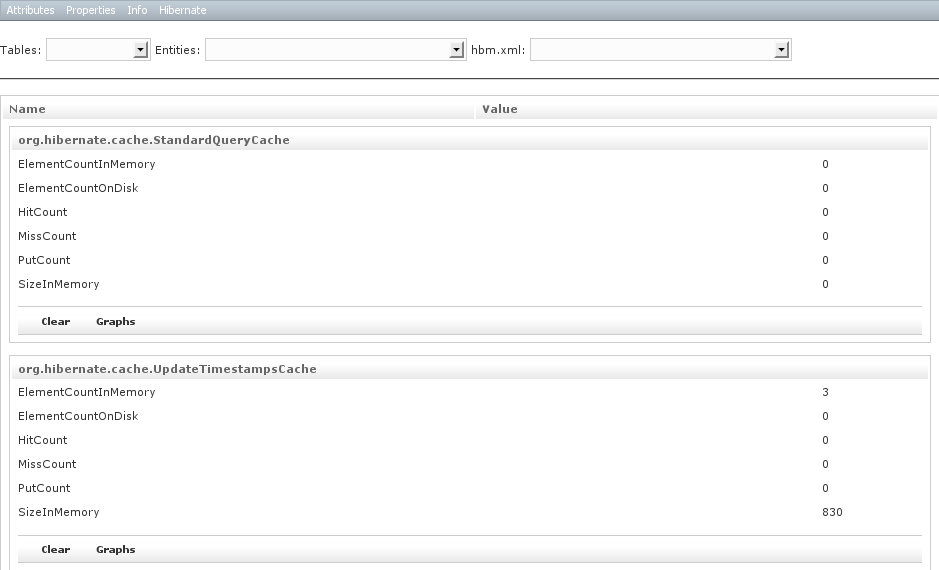
Also has links to clear the cache and display usage graphs
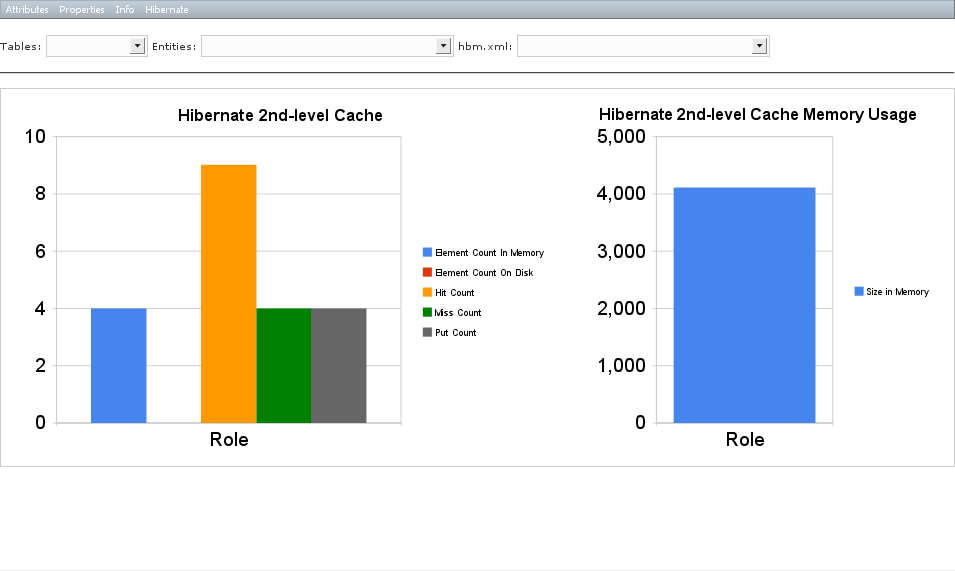
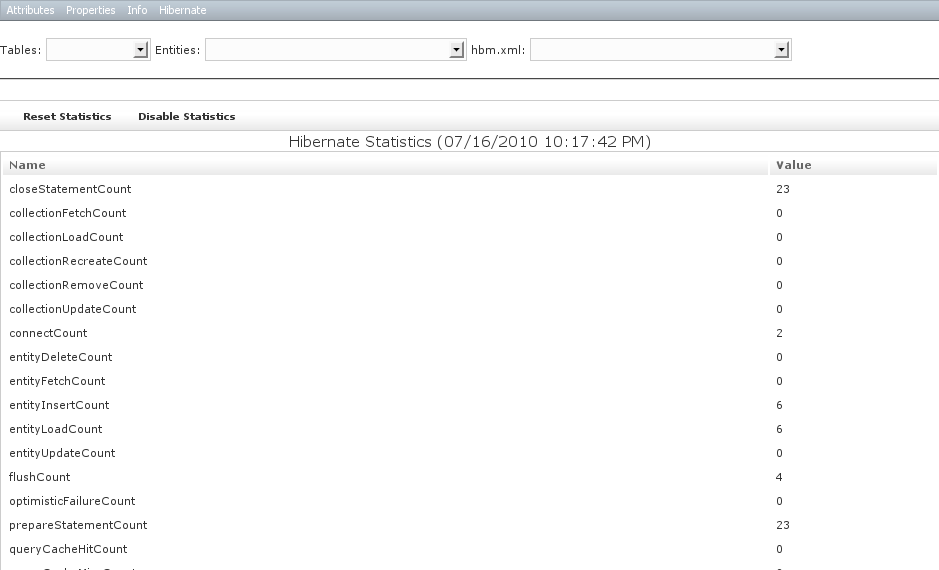
Statistics
- General Hibernate statistics
- Links for statistics for each domain class
- Links for statistics for each collection
- Links for statistics for cached queries
Combos
On each page there are three combo boxes. The Tables combo box lists all database tables and selecting one displays detailed information for that table
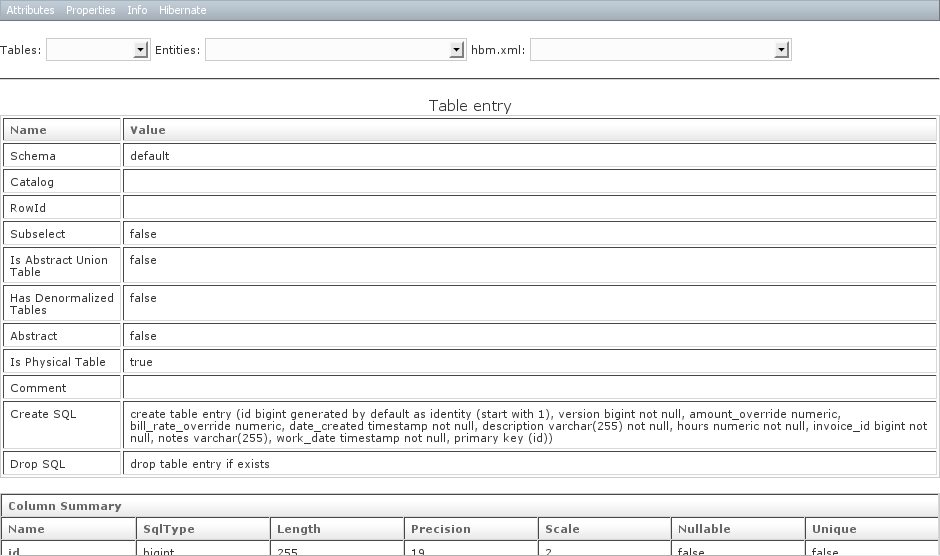
The Entities combo box lists all entities (domain classes, JPA-annotated Java classes, and hbm.xml-mapped classes) and selecting one displays detailed information for each one

The hbm.xml combo box lists all entities and selecting one displays the reverse-engineered hbm.xml that would have created the equivalent entity. This is useful if you’re having GORM mapping issues and want to see what the Hibernate configuration is

Sample Project
You can download a preconfigured sample application here
The /admin/** URLs in the sample app are restricted to users with ROLE_ADMIN. There’s one user configured in BootStrap.groovy with username ‘admin’ and password ‘password’ with ROLE_ADMIN, so you can use that to authenticate.







Oh damn ! What a wonderful stack of admin utils. 1 billion congratz Burt
This looks amazing!
I’ve got a bunch of disparate admin pages that I’ve carried with me between projects as well, but this plugin might just replace all of them.
Keep up the great work! 😀
Very very cool. Thanks Burt!
Awesome!
opening with winzip gets a: “error reading header …”
works on linux
[…] información sobre Grails App-Info plugin (traducido al […]
Fantastic plugin! Thanks Burt, had no problem with install or dependencies! The only suggestion I would have is to start home page (/admin/manage or /adminManage) with something more than menu, maybe Application Scope Variables.
Thanks Burt!
This will be very useful plug-in and saves lot of time in adding admin capabilities to the application.
this looks great! Thanks a lot.
[…] http://burtbeckwith.com/blog/?p=344 […]
[…] http://burtbeckwith.com/blog/?p=344 […]
Dude… must say excellent work… Thanks!
Excellent job Burt. We are adding this plugin as soon as we can for sure.
Is the source-code available somewhere?
@Rodrigo the plugin zips contain the source and are compiled with your application code. For the full source code, most plugins keep their source in SVN at http://plugins.grails.org/ and this one is at http://plugins.grails.org/grails-app-info/
Thank you, Burt.
This is so amazing Burt.
What do you think about integrating Mozilla Skywrier into it and allowing full development without ever leaving the browser?
Xavier – that’d be cool, but I don’t know that it makes sense for this plugin. Better to make that its own plugin I think.
Hi Burt
Thanks for a great plugin.
When I try to access graphs I get this errors.
any thoughts?
Thanks
Bala
java.io.IOException: CreateProcess error=2, The system cannot find the file specified
at java.lang.ProcessImpl.create(Native Method)
…
@Bala you need to install Graphviz as described in the docs: http://grails.org/plugin/app-info
This is simply awesome! Cool stuff!!!
Hi Burt,
I’m just testing your plugin. But:
—–
\1.3.3\projects\OfficeDepotPortal\plugins\app-info-0.3\src\groovy\com\burtbeckwith\grails\plugins\appinfo\hibernate\GrailsTemplateProducer.groovy: 7: unable to resolve class org.w3c.tidy.Tidy
—-
I do work behind a firewall, but I do not see any request for jtidy. Where is the dependency hidden?
greetings Michael
@Michael it’s a dependency of Hibernate Tools
Thanks Burt,
for the quick response. So the local-repository was the cause for our problem.
😉
thanks Michael
Hi,
This looks great, thanks!
However, when I’m trying to see the reverse-engineered “.hbm.xml”, the result textarea is always empty. Any idea?
Cheers,
Pablo
PS: No stacktrace in the logs…
Very handy tool.
Ran into a problem with hibernate tables, entities, hbm.xml action.
Behaviour is inconsistent between my app and your test app.
With my app I get NPE at GrailsDocExport.setupContext with tables and entities,
and NPE at GrailsHibernateMappingExporter.doStart with hbm.xml.
Your test app runs fine with hbm.xml action but generates no such file or directory with
tables and entities. For the latter, I have Graphviz installed under the usual location on OSX. Where should it be located?
Appreciate any guidance with these issues.
Roger
Hey Burt,
Many thanks for the great plugin.
We already have an admin page in our application. Once I install this app-info plugin I got a page after going to the URL …/adminManage.
Can I modify the plugin somewhere so that I can access my existing admin page from the ../adminManage page.
Thanks, -Krishnendu
I updated the plugin docs to describe an older feature that I hadn’t gotten around to documenting yet where you can define new menu items with the
grails.plugins.appinfo.additionalattribute. This may be overkill for a simple link, so you would probably just want to copy the plugin’s appinfo.gsp layout to your grails-app/views/layouts folder and edit it to include the link.Thanks for the response. It helped.
Hi Burt, I did not get an appropriate forum to put this question, so putting it here only.
I am trying to work with zing-chart plugin in my grails application, but somehow the charts’s just does not appear. As
In my controller :
def labels = [‘Sun’, ‘Mon’, ‘Tue’, ‘Wed’, ‘Thu’, ‘Fri’, ‘Sat’]
def data = [
‘Visitors’: [100, 300, 200, 240, 500, 100, 80],
‘Purchases’: [30, 50, 12, 20, 55, 20, 10]
]
[labels:labels , data:data]
In my gsp :
(head) section
(body) section
zing:chart type=”area” width=”200″ height=”350″
container=”acceptToConvertChart” data=”${data}” xLabels=”${labels}” effect=”4″ />
but it comes as a blank. No chart appears..
Thanks for any help.
-Krishnendu
Burt:
Found an error while creating a war file. It is on line 69 of hibernateEntityInfo.gsp. Needs a ‘=’ after ‘var’. Just thought you should know.
Jeff
Yep, that’s http://jira.grails.org/browse/GPAPPINFO-31
Burt:
Seems I stomped on protocol. Sorry about that.
Jeff
No me funciona :(….
| Loading Grails 2.0.0
| Configuring classpath
| Environment set to development…..
| Packaging Grails application…..
| Compiling 2 source files…..
| Running Grails application
| Server running. Browse to http://localhost:8080/GrailsApplication2
| Error 2012-02-14 11:11:01,715 [“http-bio-8080”-exec-5] ERROR resource.ResourceMeta – While processing /plugins/app-info-0.4.3/css/jquery.jdMenu.slate.css, a resource was required but not found: /plugins/app-info-0.4.3/css/gradient-vertical.png
| Error 2012-02-14 11:11:02,097 [“http-bio-8080″-exec-5] ERROR [/GrailsApplication2].[default] – Servlet.service() for servlet [default] in context with path [/GrailsApplication2] threw exception
Message: It looks like you are missing some calls to the r:layoutResources tag. After rendering your page the following have not been rendered: [head]
Line | Method
->> 886 | runTask in java.util.concurrent.ThreadPoolExecutor$Worker
– – – – – – – – – – – – – – – – – – – – – – – – – – – – – – – – – – – –
| 908 | run in ”
^ 662 | run . . in java.lang.Thread
The plugin doesn’t work in 2.0 yet, in part because of what you’re seeing. Unfortunately there’s no version of Hibernate Tools that works with the version of Hibernate core that we use in 2.0.x, so until there’s an update of that jar it won’t work.
Hi,
I’ve got the following error while installing the plugin
Any idea on how to fix it?
Problems occurred (un)installing plugins. See details for more information
——System.out:———–
| Loading Grails 2.0.0
| Configuring classpath.
| Environment set to development…..
| Compiling 59 source files.
| Error Compilation error: startup failed:
C:\Users\eduardo\.grails\2.0.0\projects\Intranet\plugins\app-info-0.4.3\grails-app\services\grails\plugins\appinfo\ScopesInfoService.groovy: 6: unable to resolve class com.burtbeckwith.grails.plugins.dynamiccontroller.DynamicDelegateController
@ line 6, column 1.
import com.burtbeckwith.grails.plugins.dynamiccontroller.DynamicDelegateController
^
C:\Users\eduardo\.grails\2.0.0\projects\Intranet\plugins\app-info-0.4.3\grails-app\services\grails\plugins\appinfo\ScopesInfoService.groovy: 5: unable to resolve class com.burtbeckwith.grails.plugins.dynamiccontroller.DynamicControllerManager
@ line 5, column 1.
import com.burtbeckwith.grails.plugins.dynamiccontroller.DynamicControllerManager
^
2 errors
——System.err:———–
Hi man,
I have just discovered you plugin and it seems to be great!, Do you know when we will be able to use it on Grails 2.x?
Best regards,
Sebas
It all depends on when the Hibernate team releases a version of Hibernate Tools that works with the current versions of Hibernate.
I am trying to use the App Info Plug-in with Grail 1.3.7 to obtain the reversed engineered hbm.xml files for my domain classes, as I would like to edit the mapping for some of these domains by using db table views.
I am using Windows X and Graphviz 2.28
app.grails.version=1.3.7
app.name=appInformation
app.servlet.version=2.4
app.version=0.1
plugins.app-info=0.4.3
plugins.dynamic-controller=0.3
plugins.google-visualization=0.5
plugins.hibernate=1.3.7
plugins.jquery=1.7.1
plugins.tomcat=1.3.7
Unfortunately, by going to Hibernate -> Overview -> hbm.xml -> “select class”, I am only getting a blank text box.
• Am I using the plug in correctly?
• Is it possible to mix Domain Modeling with GORM and custom hibernate mapping?
• Are GORM generated domain objects and hibernate mapped objects equivalent? – That is, if I use custom hibernate mapping, will I be able to use Grails build in features such as dynamic finders?
Thanks in advance,
I wasn’t able to use the hbm.xml combo box lists in appinfo-test application to produce the reverse-engineered hbm.xml
I am using Grails 1.3.3, jdk1.7.0_03, and Graphviz 2.28 on Windows XP.
I have tried adding the jars from jtidy-r938, freemarker-2.2.8, and freemarker-2.3.19 and to the appinfo-test\lib folder.
app.grails.version=1.3.3
app.name=appinfo-test
app.servlet.version=2.4
app.version=0.1
plugins.app-info=0.1.1
plugins.dynamic-controller=0.2
plugins.google-visualization=0.2.1
plugins.hibernate=1.3.3
plugins.jquery=1.4.2.5
plugins.spring-security-core=0.4
May someone direct me to what is needed to get the hbm.xml combo box working? I suspect that I am using incompatible libraries.
Any help is always highly appertained.
Thanks for a great plug-in, and thanks for your help,